Digital Media Productions
Gyo
Week 9
Immersive Storytelling
2024 MOD007299 TRI 2 F01CAM
Trimester 2 - Project Progress Continues
Chapter #8: The city
Due to the deadline being close I have worked on the project throughout week 8 and some in week 9 getting me to a point I was very happy about.

After adding the buildings I created the streets and added some neon lights to the buildings, this model is inspired by another model I found online which looked a lot like what I wanted to create, I decided to change it slightly but it is quite similar

Added a UFO to make it look more futuristic as some sort of advanced society, I've also added some ambiental light to give it more of a colored look.
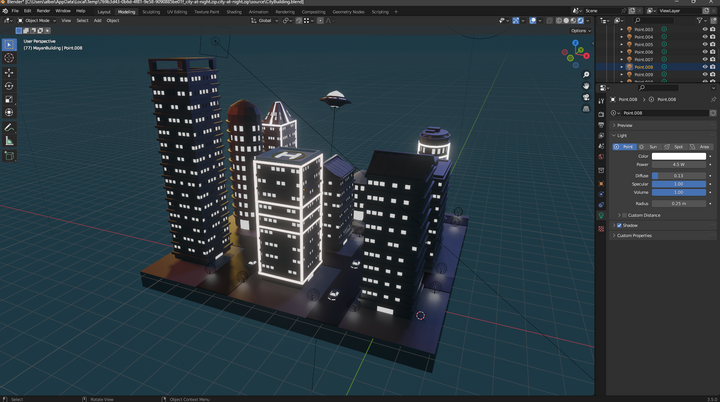
I then changed the colours on the cars and all the lights as the gray was quite boring and since it is a cyber city it couldn't just be gray

Searching online I have found a 3D Google Logo that I have used, changing the colors on it and making them into a light to make the logo seem neon.

I have then found a YouTube logo which I have put above the helipad on top of a building, also changing the buildings light to red to match the logo.
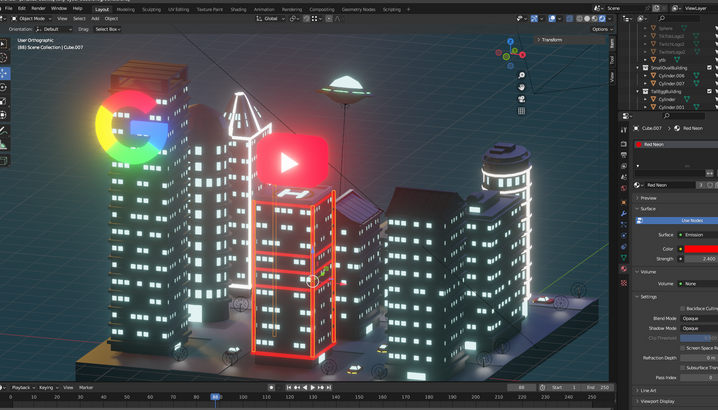
Using that same technique I have done the same for the rest of the buildings, using the right color matching the logos I assigned for all of them leaving me with this:

Overall, extremely happy with the neon holographic look of the logos and the shine really making it look like a cyberpunk type of city.
Chapter #9: Shielded
This week it was time to finish the 3D project finally. To do this I needed to do the most important part which was to create the bubble shield which I did not know how to create.
Doing my research I came onto a video on youtube that teaches you how to create a glass ball in blender. I have attached the video below.
Using the techniques in the video and following everything I ended up with a sort of translucent ball that was very hard to look through and see the city.

From here I have looked at multiple videos to find out how to make it more clear but it seemed like nothing really worked for me.
So I decided to play with all the values on the right side to see what works to create it perfectly the way I want it, quite translucent, quite clear but still having a blue tint to it to give it that "shield bubble" feeling.
Turns out the main issue was the "Transmission" values were not set up properly in mix with the "Clear coat" and "Metallic" values.
After tweaking everything to make it perfect I ended up with exactly what I wanted and needed!

Below I showcase a before and after the bubble so you can see the difference the "shield bubble" makes after being put on with the right settings compared to no shield bubble.


The light is dimmer, less bright but still neon with the streets being more cold and blue-ish, which is the perfect visuals I was going for.
I wish it was maybe slightly blurry to give it a sort of hazy effect but I am extremely happy with the way it came out
nonetheless.
